


If you’re jumping into the realm of blogging, WordPress is one of the greatest platforms to begin with, hands down!
nnnnLet me tell you about my journey with WordPress.org – it’s been quite the ride!
nnnnWhen I first started Blogging, I was totally overwhelmed With all the platform options out there, my goal was to learn how to write effective SEO-ranking content.
nnnnBut boy, am I glad I went with WordPress.org instead of WordPress.com or those fancy website builders.
nnnnYou know what’s funny?
nnnnI actually started with WIX because I thought it would be easier (spoiler alert: big mistake for serious bloggers).
nnnnOne thing I wish someone had told me earlier:
nnnnNOTE: WordPress.org is completely different from WordPress.com!
nnnnAfter three months of feeling limited by their restrictions, I made the switch to WordPress.org and haven’t looked back since.
nnnnThe flexibility is just mind-blowing – it’s like going from riding a tricycle to driving a Ferrari!
nnnnHere’s the real tea about WordPress.org: it’s like having a blank canvas with an endless supply of paint colors.
nnnnYou can literally create anything you imagine.
nnnnWordPress.org gives you full control over your site (you own everything!)
nnnnAnd the best part? You don’t need to be some coding wizard to make it happen.
nnnnSpeaking of hosting (which is crucial, by the way), I’ve tried several options before landing on WPX.net.
nnnnLet me tell you, the difference in speed and support is night and day!
nnnnIt’s like comparing a rusty old bicycle to a sleek sports car.
nnnnWPX.net has this amazing feature where they handle WordPress migrations for free – saved my halal bacon more than once when I was moving sites around.
nnnnBy combining the power of WordPress with the reliability of WPX.net, you’ll be well on your way to building a successful blog that won’t let you down.
nnnnLet’s dive in and take a look at the 5 best tools I use for blogging!
nnnnnnnnnnnnnnKey Takeaways
nnnn- n
- WordPress is a flexible and easy-to-use platform perfect for bloggers, providing wide-ranging customization choices and a large collection of plugins and themes. nnnn
- Picking the correct hosting service, like WPX.net, Bluehost, and SiteGround, is vital for making sure your blog operates well and effectively. nnnn
- Important plugins for improving your WordPress blog include SEO tools such as Yoast SEO and Rank Math SEO, caching plugins like WP Rocket. and safety plugins like Wordfence. nnnn
- Frequently improving your content for search engines, concentrating on top-notch writing, and advertising your blog via social media can greatly boost your visibility and audience. nnnn
- Putting in place safety steps, like using tough passwords, maintaining your site current, and saving your content with tools such as UpdraftPlus, is crucial for shielding your blog from dangers and data loss. n
Introduction to WordPress for the Best Blogging Tools
nnnnWhy WordPress is the Go-To Platform for Bloggers
nnnnWordPress has turned into the top pick for writers, and it’s simple to understand why.
nnnnWhether you’re beginning fresh or already skilled, WordPress gives unbeatable options and simplicity.
nnnnIt runs more than 40% of sites worldwide, making it a reliable system for tons.
nnnnOne of the main reasons writers enjoy WordPress is its power to grow alongside you.
nnnnYou could begin with a basic blog and later turn it into a complete website with online shopping tools, all without changing systems.
nnnnAlso, it’s open-source, meaning there’s a large group always building add-ons, designs, and resources to improve your blogging journey.
nnnnThe learning curve might seem steep at first – I definitely had my share of ‘why isn’t this working?!’ moments.
nnnnBut here’s a pro tip: start with a simple theme (I recommend Kadence), and only add plugins you absolutely need.
nnnnThink of plugins like apps on your phone – too many will slow things down, but the right ones are absolute game-changers.
nnnnRemember how I mentioned WPX.net?
nnnnTheir hosting is specifically optimized for WordPress, which means your site will run faster than my cat chasing a laser pointer.
nnnnPlus, their support team is available 24/7 and actually knows what they’re talking about (unlike some other hosts I won’t name… cough).
nnnnnnnnKey Features That Make WordPress Stand Out
nnnnWordPress stands out because of its incredible features that cater to bloggers of all levels.
nnnnHere are some highlights:
nnnn- n
- Customizable Themes: n
- n
- WordPress provides tons of free and paid themes to make your blog look different. nnnn
- Sites such as KadenceWP and ThemeForest offer a big variety of expert templates to pick from. n
nnnn - Plugins for All Purposes: n
- n
- From SEO tools such as Rank Math SEO and Yoast SEO to social media sharing add-ons, WordPress offers a plugin for nearly anything. nnnn
- These tools assist in improving your site and connecting with a bigger crowd. n
nnnn - Simple-to-Use Layout: n
- n
- Even if you’re not great with technology, WordPress makes it simple to build and handle content. nnnn
- Its control panel is easy to understand, letting you focus on writing instead of programming. n
nnnn - Scalability: n
- n
- Whether you’re managing a personal blog or a company website, WordPress is able to handle everything. nnnn
- Hosting services such as WPX.net make sure your site works well, even as your visitors increase. n
n
By mixing these traits with the proper equipment and materials, WordPress turns into a strong site for people wanting to begin or expand their blog.
nnnnHere is pro tip:
nnnnSSL certificates are crucial for any professional-looking website.
nnnnThey’re what make that little “padlock” icon 🔒 appear in the address bar, giving your site an air of security and integrity.
nnnnAnd let me tell you, users trust sites with an SSL certificate way more than those without.
nnnnWPX.net offers free SSL certificates, and they even have a handy auto-renewal feature to avoid any potential headaches.
nnnnIt’s just one of the many perks of working with a top-notch host like WPX.
nnnnnnn
Essential Hosting Tools for WordPress Bloggers
nnnnOverview of WPX.net – Speed and Support
nnnnWhen it’s about running your WordPress site, quickness and dependability are important.
nnnnThat’s the spot where WPX.net stands out.
nnnnI’ve been a WPX.net user for years now, and their speeds, security, and support are top-notch.
nnnnFamous for its super-fast hosting servers and great user support, WPX.net is loved by bloggers who need their pages to open fast and work well.
nnnnWPX.net gives stuff like free site moves, everyday backups, and a special-made Content Delivery Network (CDN) to make sure your blog works great.
nnnnTheir 24/7 live chat support is also a real lifesaver if you ever face problems.
nnnnThey’re very knowledgable and hand hold you through all questions and issues.
nnnnFor bloggers who care about speed and keeping their site up, WPX.net is a strong pick!
nnnnAnother thing that really sets WPX.net apart is their caching and optimization tools.
nnnnThey’ve got a system that’s lightning-fast, and you can even install their caching plugins yourself, or let their team handle it for you.
nnnnI recommend taking advantage of their optimization services, as it’ll make a huge difference in your page load times.
nnnnWho wants to wait around for their content to load, right?
nnnnWith WPX, you’ll be surprised at how quickly your blog takes off.
nnnnnnnnOther Hosting Alternatives: Bluehost, DreamHost, and SiteGround
nnnnWhile WPX.net is a top pick, there are other hosting providers worth considering based on your needs and budget:
nnnn- n
- Bluehost: n
- n
- Suggested by WordPress itself, Bluehost is easy for beginners and provides budget-friendly options. nnnn
- It’s an awesome choice if you’re just beginning and want a trustworthy host with simple WordPress setup. n
nnnn - DreamHost: n
- n
- DreamHost works great for people who aren’t tech experts. nnnn
- It offers an easy-to-use dashboard, endless data transfer, and a free website name for the initial year. nnnn
- Also, it’s recognized for its big emphasis on safety and privacy. n
nnnn - SiteGround: n
- n
- If you’re a content maker, SiteGround is a great pick. nnnn
- It provides quick load times, strong safety options, and tools such as auto updates and everyday backups to help your site work well. n
n
Each of these hosting companies has its own advantages, so it’s key to pick one that matches your blogging aims.
nnnnWhether you focus on quickness, low cost, or simplicity, these choices got you covered.
nnnnnnnnnnn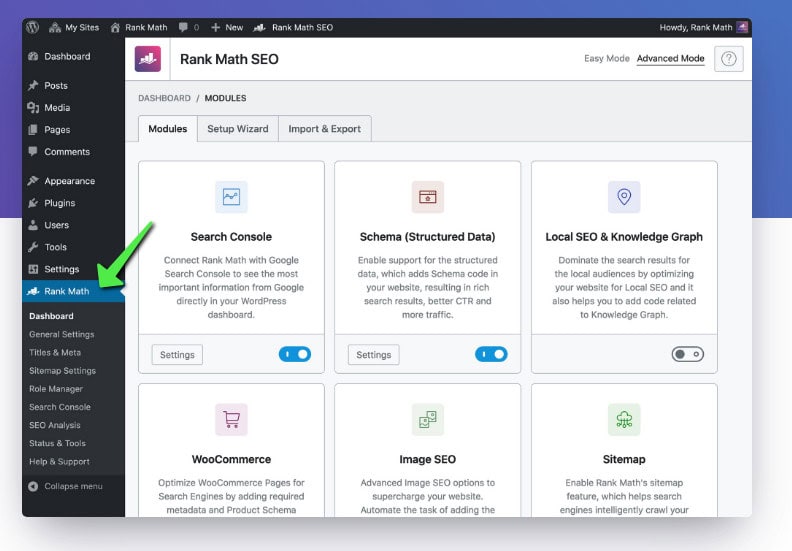
Best Plugins for Content Optimization
nnnnCreating fun and improved content is key for a good blog.
nnnnWordPress gives lots of tools to help make your content-making easier.
nnnnOne of the best-known tools is Yoast SEO.
nnnnThis tool helps you step-by-step to make your posts better for search engines, making sure your blog shows up higher and gets to more people.
nnnnIt gives live tips on how easy it is to read, how you use keywords, and meta descriptions.
nnnnAnother awesome choice is Rank Math SEO, which gives alike SEO tools but with a simpler and easier-to-use layout.
nnnnIt also works smoothly with Google Analytics, providing details about your blog’s success.
nnnnFor bloggers wanting to improve their pictures, plugins such as Elementor and WPBakery are great options.
nnnnThese drag-and-drop page creators let you design amazing layouts without needing coding skills.
nnnnnnnnUsing Templates for Faster Blog Design
nnnnDesigning a blog doesn’t need to take forever.
nnnnWordPress gives tons of templates to let you build a pro-looking site in no time.
nnnnFree themes like Kadence, my favorite (❤️), and Astra, and OceanWP are simple and flexible.
nnnnThis makes them ideal for bloggers who want a clean and fast-loading website.
nnnnIf you’re ready to spend on high-quality templates, sites like KadenceWP and ThemeForest offer lots of choices designed for various categories.
nnnnThese templates usually include pre-made layouts, so all you have to do is insert your info and adjust the look to fit your vibe.
nnnnUsing templates doesn’t just save time but also makes sure your blog appears neat and easy to use.
nnnnWith the proper mix of plugins and templates, you’re able to spend more energy on making content and less on tech stuff.
nnn
Practical Tip:
nnnnIf you’re just starting out, don’t be overwhelmed by the sheer number of themes and plugins available.
nnnnStart with a solid foundation, like the free Kadence theme, and then experiment with different plugins to find what works best for you.
nnnnAnd hey, if all else fails, you can always count on the WPX support team to guide you through the process.
nnnnnnnnSEO and Marketing Tools for WordPress Blogs
nnnnTop SEO Plugins: Yoast SEO and Rank Math SEO
nnnnSearch Engine Optimization (SEO) is super important for bringing visitors to your WordPress site.
nnnnTwo of the top tools for this are Yoast SEO and Rank Math SEO.
nnnnBoth plugins assist in improving your posts so they show up better on search engines such as Google.
nnnnYoast SEO is easy to use and gives a list for bettering your blog articles.
nnnnIt checks your writing for how easy it is to read, keyword placement, and meta descriptions, offering useful advice to make your posts more search-engine-friendly.
nnnnMeanwhile, Rank Math SEO has alike tools but with a fresher design and extra features like schema markup and linking with Google Analytics.
nnnnIf you’re new to SEO, there are tons of resources available online that can help you learn the ropes and offer step-by-step guides on how to use these tools effectively.
nnnnThese resources can teach you valuable skills like optimizing your blog posts and improving your website’s visibility in search results.
nnnnnnnnEmail Marketing Tools: ConvertKit and Mailchimp
nnnnEmail marketing is a strong method to reach your readers and get them returning to your site.
nnnnTools such as ConvertKit and Mailchimp help you create and handle your email lists.
nnnnConvertKit is made mainly for creators and writers.
nnnnIt lets you build automatic email series, divide your audience, and also make landing pages.
nnnnMailchimp, however, is a flexible tool that gives a free option for starters.
nnnnIt’s awesome for making good-looking email campaigns and checking how they do.
nnnnBoth tools connect smoothly with WordPress, so you could include sign-up forms on your site and begin building your email list.
nnnnBy mixing SEO tools with Email Marketing Platforms, you’re able to pull in more visitors and keep them interested in your posts.
nnnnnnnnPerformance Optimization Tools for WordPress
nnnnCaching Plugins: WP Rocket and W3 Total Cache
nnnnA quick-loading website is super important for holding your audience’s attention and boosting your search engine placement.
nnnnCache tools such as WP Rocket and W3 Total Cache are awesome options to make your WordPress page faster.
nnnnWP Rocket is a paid tool that’s really simple to handle, even if you’re not into tech stuff.
nnnnIt instantly sets up caching rules, improves your database, and also has tools like lazy image loading.
nnnnThis means your site will open quicker without needing to adjust tons of options.
nnnnW3 Total Cache, however, is a no-cost choice that provides detailed personalization.
nnnnIt lets you turn on browser storage, shrink CSS and JavaScript files, and connect with Content Delivery Networks (CDNs).
nnnnThough it’s slightly harder to configure, it’s a strong resource for boosting your website’s speed.
nnnnnnnnImage Optimization Tools: Smush and ShortPixel
nnnnImages might make your blog slower if they aren’t optimized.
nnnnTools such as Smush or ShortPixel assist in shrinking image file sizes without hurting quality, making sure your website loads fast.
nnnnSmush is a free tool that auto-squeezes pictures when you add them to your WordPress photo library.
nnnnIt even gives group optimization, letting you shrink many pictures at the same time.
nnnnShortPixel, however, gives better tools like WebP changing and the option to improve pictures saved outside your photo library.
nnnnBoth tools are simple to use and connect smoothly with WordPress.
nnnnBy mixing caching tools with picture optimization software, you could greatly boost your site’s speed and give a much better experience to your audience.
nnnnnnnnSecurity and Backup Tools for WordPress Blogs
nnnnSecurity Plugins: Wordfence and Sucuri
nnnnKeeping your WordPress site safe is super important, especially with the rising amount of online dangers.
nnnnProtection tools such as Wordfence and Sucuri are great options to guard your website from cybercriminals and harmful software.
nnnnWordfence gives a strong firewall and virus scanner that watches your website for strange actions.
nnnnIt also sends live notifications, so you’re able to act fast if there’s a safety issue.
nnnnThe tool is easy for starters and has options like limiting login tries to stop brute force hacks.
nnnnSucuri, however, is a full security tool that not just shields your website but also assists in cleaning it up if it becomes infected.
nnnnIt provides options such as site tracking, virus elimination, and a firewall to stop harmful traffic.
nnnnAlthough it’s a paid service, its strong defense makes it worth spending on.
nnnnnnnnBackup Solutions: UpdraftPlus and Jetpack
nnnnBacking up your site is absolutely crucial, like, seriously important! You don’t want to lose all that hard work, right?
nnnnTwo popular backup solutions are UpdraftPlus and Jetpack.
nnnnUpdraftPlus is a rockstar in the WordPress backup world. It’s super easy to use, even for beginners. You can schedule automatic backups and store them securely on cloud services like Google Drive or Dropbox. And if you ever need to restore your site, UpdraftPlus makes it a breeze.
nnnnJetpack, while known for its all-in-one features, also has a solid backup option. It offers live backups and one-click restores, which is super handy, especially if you’re juggling a busy website. Plus, Jetpack includes extra goodies like outage tracking and junk filtering, making it a really versatile tool for bloggers.
nnnnWhile Jetpack can sometimes slow down your site, both UpdraftPlus and Jetpack offer excellent backup solutions.
nnnnBy combining these tools with other safety measures, you can ensure your WordPress site is well-protected and easily recoverable, no matter what comes your way.
nnnnnnnnBonus Tools: Privacy tools are essential for your WordPress websites
nnnnYou know what’s super important for any WordPress website?
nnnnPrivacy Tools!
nnnnThink about it: you’re collecting data from your visitors – emails, comments, maybe even location data if you use certain plugins.
nnnnThat means you have a responsibility to keep that information safe and secure.
nnnnTwo of the biggest must-haves are:
nnnn- n
- Cookie Consent Plugins: n
- n
- These are a lifesaver! They make it super easy to display a clear cookie notice to your visitors. nnnn
- This not only complies with privacy regulations like GDPR, but it also shows your audience that you respect their data. n
nnnn - GDPR Compliance Plugins: n
- n
- These plugins help you make sure your website is fully compliant with privacy laws. They can help you with things like user data requests, consent management, and more. n
nnnn - Data Breach Monitoring: n
- n
- Tools that alert you to any suspicious activity on your website, like unauthorized login attempts or data leaks.
n - Tools that alert you to any suspicious activity on your website, like unauthorized login attempts or data leaks.
Don’t underestimate the importance of privacy!
nnnnTrust is key! By implementing these privacy tools, you’re showing your visitors that you value their data and that you’re committed to running a transparent and ethical website!
nnnnAlright, now it’s your turn! Go out there and create some incredible websites! 🚀
nnnnnnnnFinal Thoughts
nnnnWordPress is definitely the top choice for most bloggers, hands down!
nnnnIt’s incredibly flexible, with tons of plugins to customize your site exactly how you want.
nnnnAnd honestly, it’s pretty user-friendly, even if you’re a complete newbie.
nnnnIn this guide, we explored some key tools and tips to take your blogging journey to the next level.
nnnnChoosing the right tools can make a huge difference.
nnnnThat’s why I recommend using a reliable hosting provider like WPX.net.
nnnnThey specialize in WordPress hosting, so you know your site will be in good hands.
nnnnWe also covered essential SEO tools like Yoast SEO and Rank Math SEO to help your amazing content get discovered by the right audience.
nnnnFor keeping your site running smoothly, we looked at caching plugins like WP Rocket.
nnnnSecurity is important too, so we mentioned Wordfence to keep those bad bots at bay.
nnnnAnd don’t forget backups! UpdraftPlus is a great option to ensure you never lose precious content.
nnnnOn the creative side, email marketing tools like ConvertKit can help you build your subscriber list and connect with your readers.
nnnnPlus, there are tons of design plugins to make your blog visually appealing.
nnnnRemember, the secret sauce to blogging success is consistency, quality content, and staying up-to-date with the latest trends.
nnnnIf you’re looking for even more personalized advice or want to explore additional ways to grow your online business, check out other blog articles from The Digital Malik.
nnnnThey have a treasure trove of resources and plans to help you take your blog to the next level.
nnnnSo, what are you waiting for?
nnnnStart using these tools and watch your WordPress site transform into a powerful platform that attracts visitors, builds your credibility, and helps you achieve your blogging goals.
nnnnHappy blogging! 🧑💻
nnnnnnnnFrequently Asked Questions (FAQs)
nnnWhat is WordPress and why is it popular for blogging?
WordPress is a content management system (CMS) that lets users create and manage websites easily. It’s popular for blogging because of its user-friendly layout, wide customization choices, and a huge collection of plugins and themes that improve functionality and design.
How do I choose the best hosting provider for my WordPress blog?
When choosing a hosting provider for your WordPress blog, think about factors such as speed, dependability, customer assistance, and costs. Providers like WPX.net, Bluehost, and SiteGround are well-liked options, each providing special features that meet various blogging requirements.
What are the essential plugins I should install for my WordPress blog?
Essential plugins for a WordPress blog consist of SEO plugins such as Yoast SEO and Rank Math SEO, caching plugins like WP Rocket, and security plugins like Wordfence. These tools assist in optimizing your content, enhancing site performance, and safeguarding your blog from dangers.
How can I optimize my WordPress blog for search engines?
To enhance your WordPress blog for search engines, use SEO plugins to assist your content creation, concentrate on keyword research, create top-notch content, and make sure your site is mobile-friendly. Also, frequently refresh your blog and advertise it through social media to boost visibility.
What should I do to secure my WordPress blog?
To protect your WordPress blog, install safety plugins like Wordfence and Sucuri, keep your themes and plugins updated, use strong passwords, and often back up your site with tools like UpdraftPlus. These actions will assist in shielding your blog from possible dangers and data loss